
My VPS Baseline Before I Host Anything
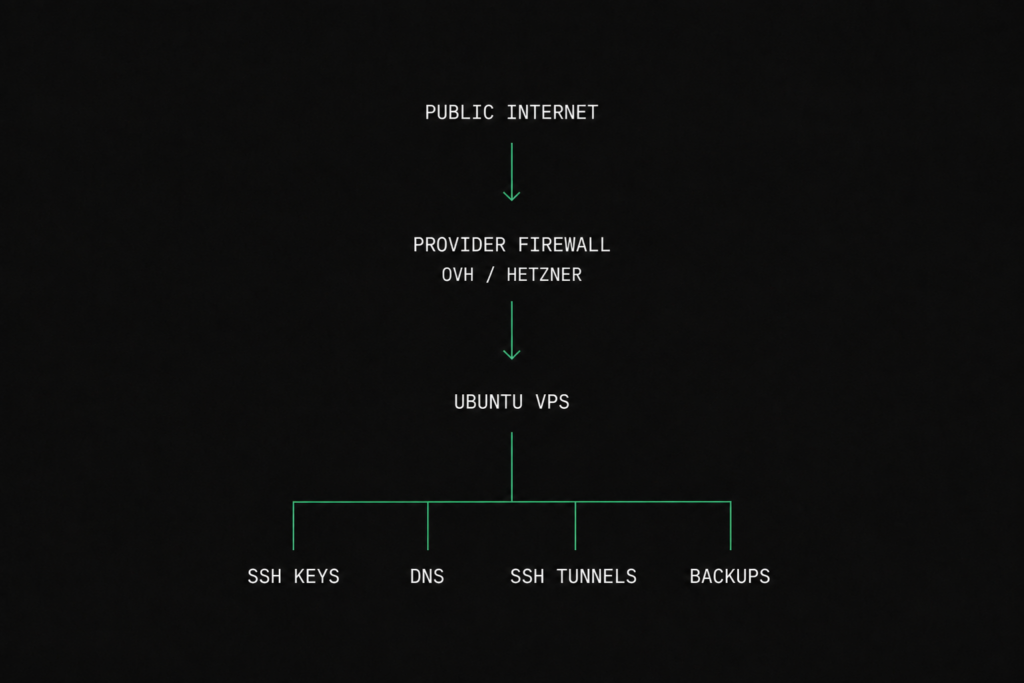
This VPS Baseline is the checklist I follow before deploying WordPress, CloudPanel, Beszel, Docker, or any other self-hosted service.
TL;DR
Before I deploy anything, I take care of the basics first:
- provider firewall
- SSH access with keys only
- basic tools and resolver sanity
- SSH tunnels for services I do not want exposed
That is the baseline. Everything else comes later.
Step 1 — Lock the Edge First
If the provider gives me firewall rules, I use them.
On OVH, that means Edge Network Firewall. On Hetzner, I use Cloud Firewalls. Same idea, different panel: keep the server quiet until I decide what should be visible.
For a typical WordPress VPS, the baseline looks like this:
- SSH only from my IP
- HTTP (80) if needed
- HTTPS (443)
- everything else closed
Example OVH-style rules:
- Allow
22/tcpfrom my IP - Allow
80/tcp - Allow
443/tcp - Deny everything else

If Linux is the first thing seeing random internet traffic, I started too late.
Step 2 – SSH Keys Before You Touch Anything
I create a normal admin account, add my key, and stop using passwords as soon as possible.
ssh-keygen -t ed25519 -C "bootriven"
ssh-copy-id user@server-ip
If ssh-copy-id is not available, I place the key manually:
~/.ssh/authorized_keysThen I test the login:
ssh user@server-ipExpected output:
Welcome to Ubuntu 24.04 LTSOnce key authentication works, I disable password login.
PasswordAuthentication no
PermitRootLogin no
PubkeyAuthentication yes
Apply changes:
sudo systemctl restart sshAlways test a second SSH session before closing the first one.
Step 3 — Make DNS Boring
I want predictable DNS. No random edits to /etc/resolv.conf and no guessing.
First check:
resolvectl statusTypical output:
Global
         Protocols: -LLMNR -mDNS -DNSOverTLS DNSSEC=no/unsupported
  resolv.conf mode: stub
Link 2 (ens3)
    Current Scopes: DNS
         Protocols: +DefaultRoute -LLMNR -mDNS -DNSOverTLS DNSSEC=no/unsupported
Current DNS Server: 1.1.1.1
       DNS Servers: 1.1.1.1 8.8.8.8
        DNS Domain: ~.
I usually keep Cloudflare as primary and Google as fallback.
If DNS is broken, everything above it becomes harder to troubleshoot.
Step 4 — Install the Tools I Actually Use
This is not a giant package list. Just the tools I use constantly.
sudo apt update
sudo apt install -y \
htop \
btop \
ncdu \
jq \
tmux \
ripgrep \
curl \
wget \
unzip \
iftop \
neofetch
My usual minimum:
btoporhtopfor system visibilityncdufor storage usagetmuxfor long-running sessionsjqfor JSON outputripgrepfor searching configsiftopfor network trafficcurlfor almost everything elseneofetchbecause I still like it
I also add neofetch to my shell startup:
echo 'neofetch' >> ~/.bashrc
Step 5 — Use SSH Tunnels Instead of Opening Ports
A lot of admin panels do not need a public port.
CloudPanel, Beszel, Grafana, Adminer, phpMyAdmin and internal dashboards can stay private behind SSH.
Local Forward
Use this when the service runs on the VPS.
ssh -L 8443:127.0.0.1:8443 user@server-ipThen open:
https://127.0.0.1:8443CloudPanel becomes available locally without exposing port 8443 publicly.

Reverse Tunnel
Use this when the service lives behind your home network and you want temporary access through the VPS.
ssh -R 9000:127.0.0.1:3000 user@server-ipVerify the listener:
ss -lntp | grep 9000Expected output:
LISTEN 0 128 127.0.0.1:9000 0.0.0.0:* users:(("sshd",pid=1234,fd=9))PuTTY
- Connection → SSH → Tunnels
- Source port: 8443
- Destination: 127.0.0.1:8443
- Select Local for forward tunnels
- Select Remote for reverse tunnels
For most admin work, this is enough. No extra ports, no extra firewall rules, no extra internet-facing services.
Step 6 — Keep a Small Admin Toolkit
These are the commands I reach for constantly:
htop
btop
ncdu
tmux
jq
rg
curl
iftop
Examples:
ncdu /
tmux new -s work
curl -I https://example.com
rg "server_name" /etc/nginx
I do not need 30 packages. I need the ones that help me understand what the server is doing.
Step 7 — Watch Backups Like You Mean It
Even if provider backups are enabled, I always verify them. A backup you have never restored is just an assumption.
My baseline:
- know where backups go
- know how often they run
- know how to restore them
- test one restore before trusting them
With Restic:
restic snapshotsExample:
ID        Time                 Host          Tags        Paths
c1a2b3d4  2026-06-20 01:15:00  bootriven     daily       /var/www /etc /home
The backup software is less important than the restore process.
Verification
This is the order I repeat on almost every VPS, whether it ends up running WordPress, Docker, or something completely different:
- Configure provider firewall
- Switch to SSH keys
- Verify DNS
- Install admin tools
- Create SSH tunnels where needed
- Verify backups
Once those six steps are done, I can start deploying WordPress, CloudPanel, Docker stacks, Beszel, or whatever the VPS was actually purchased for.
My VPS Baseline Checklist
This VPS Baseline has remained almost identical across OVHcloud and Hetzner Cloud. The provider changes. The checklist usually doesn’t.
- Edge firewall configured
- SSH key login working
- Password authentication disabled
- DNS verified
- Admin tools installed
- SSH tunnels tested
- Backups verified
If all of that is yes, the VPS is ready for the next layer.
Where I Run This
At the time of writing, I mostly run servers on OVHcloud and Hetzner Cloud. The exact control panel and firewall options differ, but the baseline stays almost identical.